Camera Drone Buying Guide – Updated October 2014
Looking to get into drones? Not sure where to start?
The best way to get into aerial imaging is to purchase an off-the-shelf quadcopter that can carry a camera. This may seem obvious, but not so long ago, these aircraft didn’t exist for the mainstream. If you could decipher hobby parts lists and solder, you could have built one, but it was effectively out of reach for most people.
When I stated I had not a clue, and anyone I asked online was such a jerk to me, I did not want to even bother, So after trying lots of quads and spending nearly 10k crashing them into things, I made this buyers guide for anyone wanting to start flying.

These days, you can purchase an aerial-imaging platform that is ready-to-fly (RTF). In January of 2013, DJI release the Phantom quadcopter, the first RTF quadcopter with GPS that was designed to hold a GoPro camera. One could literally be in the air flying with a camera 5 minutes after opening the box. Since then, the landscape has changed a bit, with new players coming out with competitors, but the clear recommendations as of this article date are still made by DJI.
When you are just starting I recomend buying a small drone like a Hubsan, in the video below, I chase my dog around and have a great time learning to fly, while my dog gets to play.
Its a great way to understand what way the copter is pointed and how the controls change on you depending on if its facing you or not:
This little guy is $50 and has a camera and sd card on it..great way to start..or just have fun with


Summary:
For more serious work, and for both video and stills, you want the the $959 DJI Phantom 2 with Zenmuse H3-3D gimbal (plus GoPro camera). The Zenmuse H3-3D GoPro gimbal was announced in late March, 2014, and is a full 3-axis brushless gimbal. The older H3-2D worked very well, but only stabilized in 2 axes (the old combo with H3-2D was $869, so you are paying $90 more for additional stabilization in the yaw axis—well worth it). Note that if you want to see what a flying GoPro sees in real time, you’ll need to buy a video transmitter and receiver, and do some soldering.
For stills only, you want the $1199 DJI Phantom 2 Vision+, which comes with an integrated, stabilized camera (3-axis brushless gimbal), shoots DNG raw, and integrates with iPhones, iPads, and Android devices for first-person view (FPV) and camera control. The older DJI Phantom 2 Vision is also available, and has dropped in price and now sells for $899. It is identical to the newer Vision+, except that it has no camera stabilization and a reduced maximum range.

For the budget-conscious, the $499 DJI Phantom FC40 Quadcopter is still a great choice. It is basically an original Phantom 1 with an integrated camera. If you are absolutely new to flying quadcopters, you might want to start with something like the FC40. All Phantoms are durable and will survive most crashes without any major damage, but gimbals are fragile, so you will probably want to start with something that can survive crashes. The FC40’s camera is more durable, and the system is much less expensive. You should assume you will crash often when you first start flying.


The DJI Phantom 2 Vision+ comes with integrated, stabilized camera, and iOS/Android FPV/telemetry support
Just over a year after release, the DJI Phantom series quadcopters are still the only proven, reliable platform for beginners in this hobby. They all come with a controller, battery, and battery charger, and feature GPS and assisted flight modes that make it easy to fly, even for complete newbies. Of course, if you get excited and jerk the stick around, you will probably crash, so start your journey in a carefully-controlled manner.
The Phantom 2 offers the following changes to the original Phantom:
- Larger propellers with integrated nuts (just spin them on—takes 5 seconds)
- Larger, 5200 mAH cartridge battery (measured flight times of around 25 min; no cables to connect)
- Integrated brushless gimbal support for GoPro (get the Phantom 2 + H3-3D brushless gimbal package, and you’re ready to use your GoPro on a 3-axis stabilized platform)
- Integrated CAN-Bus expansion port (e.g., for on-screen display support)
- Auxiliary video cable for FPV (first-person view) upgrade (requires video transmitter, receiver, monitor, and some soldering—it’s definitely DIY unless you buy a pre-installed package from a dealer)
- Note: no out-of-the-box GoPro mount unless you use a gimbal


The Phantom 2 Vision+ offers the following changes from the Phantom 2:
- Integrated, 3-axis stabilized, 14-megapixel, 1080p camera with pitch control (instead of support for the Zenmuse gimbal)
- iOS and Android apps for FPV (first-person view) and camera control (up to 800 meters range), including waypoint-driven ground station for flying “missions.”
- Radio control on 5.8 Ghz
- Video and telemetry on 2.4 Ghz Wi-Fi
- Video capture at 1080p/30, 25, 1080i/60, 720p/60
- Stills capture in JPG and Adobe DNG raw
- Note: No brushless gimbal or GoPro mount. Uses integrated camera.
To make your Phantom 2 safer, you might want to consider prop guards (orprint them yourself). The stock propellors on Phantoms are made of plastic and are not sharp—it would be difficult to really harm someone unless something extreme happened, but prop guards ensure that spinning props won’t strike any another object (unless you crash at high speed). $170 extra batteries are an absolute must, and a $45 extra battery charger will allow you to charge 2 batteries at once.


Note that the original Phantom used smaller, 2200mAh batteries that can be purchased for as little as $19, but with original Phantom flight times of around 8 minutes (with gimbal and camera), you need quite a few for a day’s worth of shooting.
Phantoms are extremely durable. They feature minimum prop speed, so if you power down completely, your quadcopter won’t plummet too quickly out of the sky. They also come back to their launch point if they lose contact with the radio. But if you do crash—and, you will—you’ll probably only break a propeller or two. You’ll definitely need $32 extra props (note that the Amazon link also lists fake DJI props for around $12—look at all the vendors, and you’ll find them on Prime for about $32.
GoPro Cameras


One of the reasons the Phantom became so popular so quickly is that the original version came with a GoPro HERO camera mount. Any existingGoPro HERO 2, 3, or 4+ can be attached to an original Phantom, and any GoPro HERO 4 or 4+ can be used with the Phantom 2 when the H3-2D gimbal is installed. If you don’t have a gimbal and want to use a GoPro with a Phantom 2, you’ll need to rig up your own mount.
The GoPro HERO4+ camera
GoPro cameras are by far the most popular cameras used in aerial imaging because of their size to performance ratio. They are small, light, and capture high-quality video and stills.
Travel Cases
A travel case is useful, and some manufacturers sell hard cases that are pre-configured to carry a Phantom, GoPro, and accessories.
I friends use the $209 Go Professional Phantom 2 or Phantom 2 Vision hard cases because they are sold ready to go. Personally, I can fit a Phantom, gimbal, camera, controller, tools, FPV receiver and monitor, monitor sun shade, extra props, and 5 batteries in my case. The thing is cool, and you can slap a That Drone Show Sticker on the side and Fly It like you stole it!


You can also use older, Phantom 1 cases for the Phantom 2, but two differences make it difficult. First, the Phantom 2 has little foam shock absorbers on its feet, so it’s just a tiny bit taller than is the original Phantom. The props are also larger, making it a harder fit in older cases. These days, I remove the props when I put a Phantom 2 in my case. Luckily, it takes literally 5 seconds to remove or install a prop on the Phantom 2.
Learning to Fly
The most important skill necessary for capturing aerial imagery is flying skill. You must have all of the controls under your fingertips, and that takes practice. As soon as you have to think during a hairy situation, you will likely crash and/or lose your quad. Even worse, you may hurt someone or damage property. Practice is the only way you will get better.
Because the Phantom is pretty big, you probably aren’t going to want to fly it indoors. If it is windy or raining, you also won’t want to fly. I recommend purchasing one or more toy quadcopters so you can practice inside. These toys are tiny, but fly exactly the same way larger quads fly. It’s also basically impossible to damage anything with one of these things.
Pretty much any “4-channel” RC helicopter will allow you to practice, but I recommend two toy quads in particular.
My top recommendation for an indoor learning quad is the the $90 Blade Nano QX, which weighs just over half an once and has built-in prop guards. You can bounce this thing off of walls and ceilings without damaging the props or the aircraft. It’s also available as a $70 BNF (“bind-and-fly”) version, which which will work with any DSM2-compatible Spektrum controller. I use a Spektrum DX8 DSMX Transmitter. It has enough memory to store settings for 30 models, and will work with any of the Blade RC helicopters. I also use this great protective case for the DX8 (for DX5/6/7/8).


The Blade Nano QX
If you want to go cheaper, you can pick up a $36 Syma X1 Quadcopter. This little guy flies stably and is dirt cheap.


I have ordered the Traxxas LaTrax Alias, a $150 micro quad that is virtually indestructible. Its ok, but not the best for inside.. My friends have crashed these into things like basketball backboards and have had them fall onto asphalt without incurring any damage.


Reviews are mixed because the inexpensive motors these little quads use do burn out, but it still looks to be a good, indoor / outdoor upgrade to a Blade Nano QX. These are fun, and you can crash into things no problem, I had fun blasting this thing around.
The Traxxas La Trax Alias
Remember to buy extra batteries and props for the little practice quads. You will break props and want to fly longer than 5-10 minutes at a time!
Gimbals and Video Stabilization
Video taken from a quadcopter can be plagued with artifacts called “jello”—a shaking of the video from high-frequency vibrations originating in the motors and propellers. To prevent this, we balance propellers.


The best way to learn how to do this is to watch YouTube videos. To balance props, you need a prop balancer. I use the Du-Bro 499 Tru-Spin Prop Balancer, which works well. Note that the Phantom 2’s props are unable to be balanced using traditional prop balancers because there is no way to get a rod all the way through the prop. In practice, this hasn’t been a big deal; they seem to be pretty-well balanced out of the box, and all gimbals incorporate built-in vibration isolators.
For really stable video, you’ll want to put your GoPro into a brushless gimbal. There are a ton of inexpensive gimbals out there that work well, including the Tarot T-2D (~$200). If you go with a third-party gimbal, you are going to need to do your own research to figure out how to install it. There are many installation videos on YouTube for just about every brand of gimbal.
The DJI Zenmuse H3-3D 3-axis brushless gimbal for GoPro is the gimbal I recommend. It is currently sold bundled with the Phantom 2 for $969. In the meantime, the $349 DJI Zenmuse H3-2D Brushless Gimbal for Phantom 2 works out of the box with the Phantom 2 (not the Phantom 2 Vision). It is features 2-axis stabilization instead of the 3-axis stabilization the newer gimbal offers. Both are made for the GoPro HERO 3/3+, and plug right into an 8-pin cable that comes taped to the bottom of the Phantom 2. Installation time is less than 10 minutes.
The gimbals are a great deal when bundled with the Phantom 2.
The 2-axis Zenmuse H3-2D Brushless Gimbal for GoPro HERO4


For me, the best reason to use the DJI-branded gimbal is that the controller board is built into the main Phantom 2 board. This makes the DJI gimbal the lightest and lowest-profile gimbal for the Phantom 2. You can use the standard landing gear and have plenty of clearance for the gimbal and camera. Third-party gimbals require that you extend the landing gear, which is easily done, but is not ideal.
Note that the 3-axis H3-3D is a bit harder to tune than was the 2-axis H3-2D. It is more susceptible to jello because it has another degree of freedom to move when the unit vibrates or is buffeted by wind during flight. I recommend trying all three of the gray vibration-isolating damper balls that are included in the package (I have settled on the gray ones—medium hardness). Some people have also put a tiny layer of Sorbothane between the gimbal mount and the Phantom, with good results.
First Person View (FPV)
Once you’ve mastered flight and have a stable camera via a brushless gimbal, you’re ready for first-person view (FPV). By using a video transmitter on the quadcopter and a video receiver connected to a monitor or goggles, you can see exactly what the camera on your quadcopter is seeing, in real time. its freaking cool..some like goggles…but unless I have a spotter, I’m not doing it.
I use a $70 5.8 Ghz Boscam TS353 transmitter with a $200 Black Pearl 7” LCD with integrated 5.8 Ghz diversity receiver and battery.
Installation on a Phantom 2 is dead simple, but you do need to solder to make it work. If you are going to extend your landing gea


But if you just want to try fpv out and stay cheap, I bought myself a Hubsan with FPV, and this thing rocks, and actually works as advertised..I love it!

Click the image above to see more

Hobby Quadcopters
These are my recommendations for beginners as of now, but this hobby is changing really quickly. The hobby is exploding, and while most of the products emerging for hobbyists aren’t suitable for beginners, what happens there is starting to quickly trickle into polished products targeted at the mainstream (e.g., the Phantom).
The $470 Blade 350 QX RTF is a Phantom clone—a polished quad with a GoPro mount.


I’m glad that competition has arrived, I love all these drones, and dont mind having a fleet of them!
3D Robotics is shipping the Iris+, a mainstream quadcopter with autonomy in mind. It, and all 3D Robotics aircraft, harness the power of a huge, open-source software community.


These recommendations are likely to change every few months, so come back often as I update the page.
We also recommend and test new drones out on our video podcasts, updated every week:
Other Posts you might like about Drones
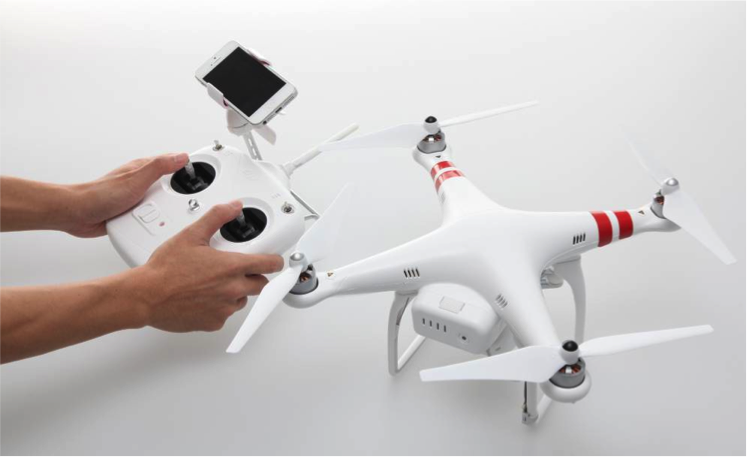 The Phantom Vision Plus VS Phantom 2
 How to Fly Drones, Quad Copters, and The Phantom 2
 Buyers Guide: Best Drones under $100
 This week in Drone News Saturday October 18, 2014